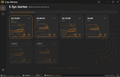


E-Sys Ultimate at a glance
- License: 7 days, 30 days, or Lifetime – each for 1 PC
- Languages: English and German (Beta)
- Vehicles: Supported BMW F and G Series as well as selected I Series models
- E-Sys: 22.06 to 25.x; 24.06 or 25.10 are recommended
- System: Windows 10/11 (64-bit) with appropriate PSdZData
- Delivery: E-Sys Ultimate Launch - E-Sys_Setup-22.06
What is required for E-Sys Ultimate?
- Windows 10 or Windows 11 (64-bit) on a suitable PC or laptop
- E-Sys 22.06 to 25.x – recommended: 24.06 or 25.10; E-Sys 3.30 is not supported
- Appropriate PSdZData: Lite for many coding tasks, Full for supported flashing and programming tasks
- Vehicle connection: a suitable ENET cable, if necessary with a USB-Ethernet adapter, or a compatible ICOM interface depending on the vehicle
- Stable vehicle power supply during the work, especially for longer coding or programming processes
E-Sys Ultimate: Features for BMW F, G, and selected I Series
E-Sys Ultimate bundles numerous tools for BMW vehicle coding and control unit analysis. Available features depend on the model series, year of manufacture, equipment, control unit, data version, and required authorizations.
- FDL and CAFD editor: View, search, and edit coding values and supported parameters.
- "What can I code?": Find coding options and associated setting groups.
- FA and FP: Analyze vehicle order, vehicle profile, production data, and equipment information.
- SVT tools: Examine control units, software versions, and CAFD assignments.
- NCD comparison and backup: Compare coding files and back up data versions.
- Fault memory: View and analyze fault entries from supported control units.
- Service functions: View vehicle-specific service and battery information.
- Launcher: Clearly manage E-Sys installations and vehicle data.
FDL editor and CAFD coding with E-Sys Ultimate
In the extended FDL editor, search, filters, and additional setting names help you find parameters faster in supported CAFD files. "What can I code?" allows you to view suitable coding options and associated settings.
Not every displayed option is usable on every BMW vehicle. Further information can be found in the E-Sys Ultimate guide with features and coding information.
Vehicle order (FA), vehicle profile (FP), and SVT tools
With the vehicle order (FA) and the vehicle profile (FP), you can view the vehicle type, production date, and equipment features such as SALAPA codes. The SVT overview shows information about control units, software versions, and coding assignments.
BMW fault memory, backup, and NCD comparison
E-Sys Ultimate offers additional tools for fault memory analysis as well as for backing up and comparing coding data. An NCD comparison helps make differences between stored data versions traceable.
Note: Fault memory display does not replace comprehensive vehicle diagnostics. Suitable backups are recommended before making changes.
E-Sys Ultimate in video
The video demonstration shows the user interface and selected features of the E-Sys Ultimate Launcher.
Helpful guides
E-Sys Ultimate: Compatibility and System Requirements
| Vehicles | Supported BMW F and G Series and selected I Series; not every feature is available even on models up to 2026. |
|---|---|
| Operating System | Windows 10 / 11 (64-bit) |
| E-Sys Versions | 22.06, 22.10, 24.06, 25.10; Recommended: 24.06 or 25.10. E-Sys 3.30 is not compatible. |
| PSdZData | Appropriate data version required; 4.61.30 in the example shown. |
| Vehicle Interface | ENET or suitable ICOM hardware (e.g., ICOM Next; A1/A2 only with suitable vehicle and software configuration). |
| Shown Configuration | Windows 11, E-Sys 25.10.03, and PSdZData 4.61.30. |
Important Note on Secure Coding and Online Authorizations
Newer vehicles may require additional security features or online authorizations, such as Secure Coding (NCD 2.0 / NCD 3.0), LCS, SFA, or KDS. The Launcher does not replace a required manufacturer authorization and does not guarantee that all control units can be coded.

E-Sys Ultimate License & Activation
Choose between 7 days, 30 days, and Lifetime. Each license applies to 1 PC and is tied to the activated hardware. The Lifetime option is a one-time purchase without monthly renewal.
In the case of a pure Windows reinstallation on the same PC, the existing license key can be reused as long as the license-relevant hardware remains unchanged. In the case of an SSD or hard drive replacement, a new license key is required. An additional or free replacement key is not automatically provided after a reinstallation. Keep your key safe.
New software versions, updates, or additional features are only included if they are expressly stated in the respective offer. The license period begins according to the conditions specified at activation.
E-Sys Ultimate in German (Beta) and English
The English user interface is available. German is currently in beta: Individual menu items, technical terms, and descriptions may still appear in English or be linguistically revised. The beta designation refers to the German translation.
Frequently Asked Questions about E-Sys Ultimate (FAQ)
What is the difference between E-Sys and E-Sys Ultimate?
E-Sys is the underlying software environment. E-Sys Ultimate is a launcher with additional features, such as an extended FDL/CAFD editor and analysis tools.
Which languages are available?
English is available. The German translation is currently in beta; individual texts may still appear in English.
How many PCs does a license apply to?
Each of the three license variants applies to one PC. Activation is tied to the device hardware.
Do I need a new license key after a Windows reinstallation or SSD replacement?
After a Windows reinstallation, the same key can be reused on unchanged hardware. In the case of an SSD or hard drive replacement, a new key must be purchased. A new key is not issued free of charge with a reinstallation.
Are E-Sys and PSdZData included in the delivery?
The digital offer includes the E-Sys Ultimate Launcher. A suitable E-Sys version and PSdZData are required for use. Please note the information about the specific download package; connection cables and diagnostic devices are not included.
Can every BMW vehicle be coded?
No, not without limitations. Many supported BMW vehicles can be modified with E-Sys, but certain models, control units, and features may be restricted or require manufacturer authorizations.
Is an ENET cable or ICOM included?
No. Suitable connection hardware – for example ENET or, depending on the vehicle, a suitable ICOM interface – must be available separately.
Does E-Sys Ultimate support version 3.30?
No. According to the product specifications, E-Sys 3.30 is not supported. Versions in the range of 22.06 to 25.x are listed as compatible.
Are all coding functions available for BMW models up to 2026?
No. Whether a feature is available depends on the specific vehicle and control unit. Newer vehicles may have additional requirements such as Secure Coding, NCD 2.0/3.0, LCS, SFA, KDS, or online authorizations.
In the BIMER-PRO guide you will find additional information about BMW coding, the FDL editor, and the required vehicle data.
Go to the E-Sys Ultimate guideNote: E-Sys Ultimate is an independent software extension by BIMER PRO. BIMER PRO is not affiliated with BMW AG. BMW and MINI are registered trademarks of BMW AG. All rights to the respective trademarks remain with their owners. Support for individual coding may vary depending on the vehicle and software version.